Computer Bits

Windows, Mac, Linux for Advanced Users and Admins

VLC Media Player Problem under Vista

Posted by amida168 on January 25, 2007

[Update] I tried the latest version of VLC player (0.8.6d) and it played OK without modification. 12/27/2007

VLC is my favorite media player. It plays almost every media format and you can get it for every major platforms.

I tried VLC to play some AVI files on Vista RC2. It didn’t play them properly. I can hear sound but no video showing. I remember running into similar problems on XP. I had to reduce the color from 24 bit to 16 bit. I tried to do the same on Vista RC2, but it’s a no go. Still no video.

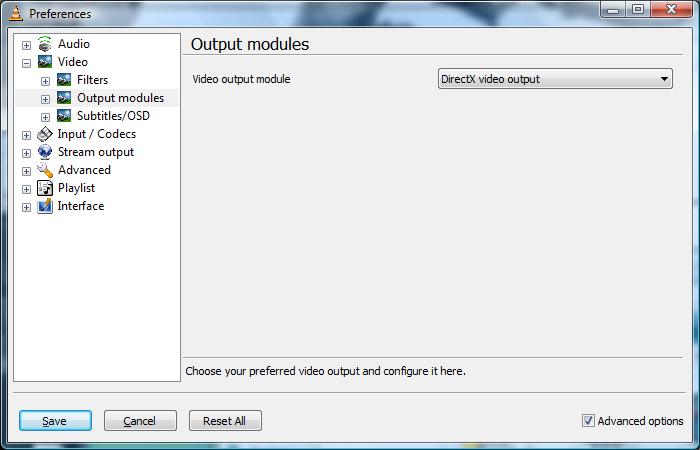
I then found this solution. It tells you to set the video rendering engine to OpenGL. I tried to use other settings and found that “DirectX video output” and “Windows GDI video output” also work. Here are the steps.

  1. Open VLC media player.
  2. Click on Settings and select Preferences… .
  3. Expand Video and click on Output modules. Note that DON’T expand Output modules, just click on it.
  4. Check Advanced options in the lower right corner.
  5. Set Video output module to either “DirectX“, “OpenGL” or “Windows GDI
    vlcpref.jpg

You’ll need to restart VLC media player after the change.

x-click-but04.gif


Find deals on Amazon.com
Vista Notebook Computers Electronics iPod MacBook MacPro

207 Responses to “VLC Media Player Problem under Vista”

  1. Massimo said

    thanks a lot
    massimo

  2. bex said

    Windows GDI Seems to work the best

  3. T.n said

    GDI works the smoothest, i never would have thought of this… THANKS!

  4. Ansh said

    Thank you so much!!!

  5. tim tim said

    hey man
    thanx a lot
    was cursing the whole world
    you put and end to that :)
    warmest wishes

  6. Bob said

    GDI does not seem to work for me especially when watching a DVD ISO File, can’t click anywhere on the dvd menu.

  7. Justin said

    Wonderful! I had to use OpenGL because DirectX makes Aero switch to Basic, but OpenGL works great. THANKS!!!!

  8. Greg said

    I was almost about to install XP back on my computer. just so i can have VLC. Thank you very much

  9. Wille said

    Thank you very much, u solved my big problem!!

  10. luz said

    thank you so very much!!!! i wanted to kill my computer because i had tried everything and it still wasn’t working. thanks :-D

  11. Bawoo said

    thanks man!

  12. Chris said

    Finally VLC Works on vista!

  13. oSourceM said

    thanks a lot mate ;) cheers

  14. Jules ~ said

    Yea for the internet !!

    {{{{ Hugs }}}} Jules

  15. michael said

    hi thank alot its working cant belief it you very clever

  16. gs said

    U r a saver.. i was pissed off at vista.. thank you.

  17. Fartun said

    how come when i use windows gdi the quality is reduced a bit?

  18. Maxx said

    Your awesome. That saved me hours, and countless bottles of wine…

  19. Chad said

    Some of my observations:
    Windows GDI – Run the smoothest, but the worst quality. When in full screen mode I am unable to use keyboard commands.
    Direct X – Changes to Vista Basic colors, but who cares. Better quality than GDI, but it just doesn’t seem perfect. Keyboard commands work in full screen mode however.
    OpenGL – Not sure why, but on my comp it’s very laggy, enough to make everything unwatchable. Sounds like it works on other computers though.

  20. Tom said

    Awesome!

  21. Fartun said

    a big thanks to chad for helping me out
    =)

  22. sol said

    you know wot, your a star, thanks a lot mate

  23. Ross said

    Thanks mate!!! I almost “drop-tested” my laptop…

  24. hero! this is awesome! w00t!

  25. Adrian said

    Works great… thanks so much!

  26. |_Borg_| said

    Very well done man. I have used this player for a very long time and was disappointed to see it did not work under Vista until now. Your efforts are greatly appreciated. I can now rid of WMP! woot! :D

  27. Paolo said

    Thanks a lot!!!

  28. meck said

    another thanks…worked wounderfully

  29. AnimeSonic said

    I had to use DirectX to get video to appear on my secondary monitor

  30. IA said

    Thanks! Huge help.

  31. gareth said

    top man, thanks I have been trying to sort this for ever!!!!

  32. Ketav said

    Thanks a lot boss… i tried all the possible things. finally i got this link.. Thanks a lot.. it really works.

  33. Magnus said

    Didnt think it would be so simple.

  34. Jason said

    wow thanks

  35. Nick said

    Brilliant solution, cheers

  36. Paul said

    Thanks for me too.
    You da man!

  37. brenie said

    hey up lads need sum help it does nt apper the gui windows thing tryed dircetx ad the other turned of the rgb colour iam now geytting a black sceen ad a fanit flicker of about 1 second wear i can see the movie thats being plkayed any help wood b very very great full other matters test divx pro gud installation missing the mepg 1 codec 4 sum reason vlc resolved the issue with nero7 4 vista sum theing that might b ov interest xp regisitry cleaner start up as admininsterater cleaned it up fat when u go 2 delete it ll hang 4 a while but bear with it simes 2 b working

  38. brenie said

    installed divx pro was haveing pro;bems with the mepg 1 codec they have a very fancy tool indeed 2 repair missing dlls ad so forth bascially all in coders r working very very pleased thought pass it on full divx in codeing on vista starting 2 feel like xp wed a new look nice 1 xxxxx

    o yea 2 my last post prolbems with vlc 1 sewcond of picture than a black screen here sound done much of the above menthioned no gui wiondows mentions command promp with in the program little lost did gain picture 4 sum time lost it again doing head in gud little player a must have xxxxx

  39. thanks said

    Thanks that fixed my problem. Good looking out! Windows GUI is the best. It lets you keep vista aero on.

  40. pavan said

    thanks a lot man…. u figured it out

  41. vlc tings said

    vlc no help got divx 6.0.0 installed weorking transcodeing can also use in media centre ad media player all thow reverts 2 basic mode further work 2 b done cant get this vlc thiong working sirpize sirprize most ov the cracks for xp r working just applyed differently got this running like a bomb lolololo as ive said xp wed a new faCE FEW BITS MISSING ID RATHER OF HAD FOR CLEANING UNISTALLS namely folders regisrty cleaning the lot haveing a vey gud day pushing this vista crap 2 its limits lololoolo

  42. vlc tings said

    forgot 2 mention this is a clean install not of the back ov xp is this cwear iam getting prolbems cud anybody throw a little light thanks brenie

  43. godfarter said

    Thank you!

    I was thinking of waiting for a VLC Vista release but your solution has solved all problems.

    With your help VLC has once again showed its versatility in the face of so many incompatibility issues with Vista!

  44. Svein said

    thank you… thank you… thank you… thank you…

  45. Dave said

    Thanks a lot.

    Don’t use OpenGL – it sucks. DirectX didn’t work for me.

    Use Windows GDI.

  46. delo said

    thanks a lot bro, i was gonna take back this comp.lol
    now to fix my windows media player…..

  47. Nino said

    Works alsome,..!! Thanx

  48. Hannah said

    Mwah! Thankies. :o )

  49. Troy said

    Cheers! Was having some audio sync problems playing xvids with media player and nero vision. Thought I’d give VLC a shot only to be disappointed by flashing colours instead of video. I changed the video output settings to DirectX and now it works perfectly and no sync problems.

    Thanks again, your help was much appreciated!

  50. the man said

    thanks for this tips it helps me

  51. Lazy said

    U are the best thanks alottt

  52. heymaynard said

    This didnt work for me! I cannot see Windows GDI? Am I doing it wrong? I have vista premium

  53. amida168 said

    Heymaynard,

    What version of VLC player you have? The latest one is 0.8.6a.

  54. N8 said

    ty man

  55. holSee said

    Thankyou buddy

  56. Vincent Smithy said

    ok i dont know how to follow those instruction, when you go to the output modules thingy, how does it work after? how do you select them?

  57. Vincent Smithy said

    ok i have sortedit now :P

  58. DTWildman said

    Thank you!

  59. Harmo777 said

    thanks, i ended up using OpenGL seems to work the best for me, Direct X disabled the areo (its dosent really make a difference, areo is turned back on after you finsh watching something anyway) Windows GDI worked but seem to be missing alot of colors,(tested using 1080p simpsons movie trailer)

  60. cougar said

    Thanks Amida168, good work. Was already downloading that Softpedia package, in the meanwhile I did some research and I found out, it’s related to Alexa and has lots of malware included. I like that VLC player too and I’m glad it works now with Vista.

  61. John said

    Thanks heaps

  62. Gregory said

    Thank you very much vlc is the best player I’ve found. thanks again for the fix

    ashtin darksbain (Gregory)

  63. fred said

    this helped for me, but cannot click any menu items with mouse (mouse click just toggles fullscreen)

    however dvd menu can be navigated with arrow keys and enter.

    also on fullscreen gdi keyboard commands dont work, and quality is slightly reduced with an occasional millisecond lag. havent fully tried the other options

  64. Thomas said

    Thanks alot! I was worried there was something wrong because I coudn’t play the files using VLC. You saved my day ;)

  65. Dalton said

    Thank you! Now I don’t have to switch do XP to watch MPEG4 videos.

  66. mattias said

    Just want to say thanks from sweden!

  67. jothan said

    Thanks!!!!!

  68. piet said

    Thanks mate!

  69. Jangster said

    Thanks for the tip. Its working now!!!!

  70. Ruby said

    i dont quite understand it, but it worked.. thank you for sharing it..

  71. karun said

    Thanks a lot … It works perfect !!

  72. CJL said

    thank you so much !!!
    You saved me !!

  73. backspace said

    Kudos to you my friend!

  74. jc98 said

    that got it

  75. ZeageR said

    ty m8!
    works with charm (:

  76. kris said

    thanks alot playin .bin .cue movies on vista ,working great as open gl

  77. ntr lanja said

    thank you very much

  78. Tony said

    Thanks been looking for a solution to this for weeks.

  79. John said

    Thank you I just installed Vista, going through all the esential apps VLC instals no problem but only sound play no video. A quick google and your solution pops up. Many thanks without it I would not have found the silly ascii art option.

  80. Arnold said

    Cheers, it works great!

  81. Jonas said

    Awesome, thank you very much!

  82. Vish said

    Thanks soooo much. I was starting to get pissed at Vista :p

  83. Evil Mochi said

    Thank you so much ^3^!!! I was going crazy! It kept doing this stupid thing where I could only see the video when the subtitles were active D: that’s no way to watch a movie

  84. realheadache said

    tanx mate,

    that was a big helper

  85. anand said

    Thanks a lot

  86. Westifire said

    Aw man. Quick search and this thread comes up.

    Vista’s compatibility issues are getting annoying. Thanks for the quick tip. Now I can go back to using VLC again!

  87. SwisSlesS said

    Awesome fix. Thanks.

  88. mike said

    HELP…when i go into the preferences to change the module output, i dont see directx, the only options i have are cube or transparant cube?!

  89. m said

    thankss sssssssssssooooooooooooo much!!!

    i thought i’d loose all my divx converted files :D

    gdi works best for me too :)

  90. ilkay said

    thanks a lot dude it works

  91. amida168 said

    Mike,

    You looked at the wrong place. The CORRENT setting is at Video -> Output modules. The setting you talked about is at Video -> Output modules -> OpenGL .

  92. Josh said

    THANK YOU SOO MUCH

  93. Kal said

    dude you rock, i guess the rest of us are just too lazy to spend hours looking into the preferances options. thanks again. man what a let down vista is eh? all the good programs dont work ie. powerstrip, daemon tools (well u have to update) and others too.

  94. John Monahan said

    Sorry but none of the above worked for me. Can ger Media Player classic to work fine under Viata (business) but not VLC media Player.
    Anybody else have the same problem?

  95. dan said

    thank you so much! was stressing so much about this. your a genius ta

  96. Boban said

    THANKS!!!!!!!!!
    GDI works best.

  97. Bill Bamford said

    I have vista for business on my new laptop from Dell. I have tried changing to OpenGl and DirectX. I don’t have the option for WindowGDI. When I expand Video – and Output modules, I can’t tell which is actually selected. When I move my curser to one of the 3 I press enter. Then Save but nothing seems to change. Also, my DVD has a menu that can be viewed but when I play the movie, all I get is sound.

  98. amida168 said

    Bill,

    You forgot to check the “Advanced options” in the lower right corner. Also, don’t expand “Output modules”, just click on it. Take a closer look at the screenshot and you’ll know how to do it.

  99. GoldfishGobbler said

    ^^^ that’s pretty impressive, don’t think i’ve ever seen a success rate like that before on a forum!

    Here’s another one for the list: It fixed it for me! DirectX didn’t work, but others are fine

  100. Bill said

    Damn you’re good. Thanks dude

  101. Neko said

    Finally, the nightmare is over!! thanks a lot, i thought there was something wrong with the player or my laptop

  102. David said

    Thanks! I must have reinstalled this thing 5 times…!

  103. ravi chandu said

    thanks a lot………u solved the problem………

  104. pooja said

    thaks a lot

  105. willis said

    HELL YES!! thx so much man!

  106. rene said

    God bless u, you’re a genius.
    thx a lot.

  107. Romeo said

    You’re the man. Thanks for saving me from kicking my pc in frustration. If there was a medal for this kind of thing, you should have it.

  108. Rami said

    Thank you so very much!

  109. saurav said

    thanks man!
    u r gr8

  110. randy orton said

    you’re the man!

  111. Josh said

    Awesome, works great now.

  112. Paolo said

    Thanks a lot. I was about to burn my bin file when I found your solution. Now my wife is happy.

  113. johnnie fox said

    Thanks so much, vlc was not working at all until this. THANK YOU!!!!

  114. id kenneth said

    thanks a lot man. I love vlc and wasn’t going to let it go.

  115. fb said

    hey, i was going crazy trying to get vlc to work again ony vista. truly, thanks a lot.

  116. pinocchio said

    Thanks a lot amida, you made my weekend great…

  117. Philip Rooney said

    Thank you i think i love you for that tip…

  118. ImMortaL said

    dude… ive looking for this yearsssssssssssss
    tnx alot!!!!!!!!!!!

  119. Theo M said

    Hi Mate,

    your a champion, playing most types of video format in vista aswell as just getting basic audio music to play is an absolute mission on this OS..

    thanks heaps for that.

  120. jimbo said

    Yes, use openGL. Don’t forget to press stop before changing to different settings, if you change them while playing something they won’t change.

  121. Stoke City FC Fan said

    Thanks to you I can now use the Gr8 VLC program on VISTA!

    U R A Star!

    Thanx!!

  122. Prateek said

    Thanks, I was having the same problem.

  123. Nag said

    this is not working for me. plz help.

  124. lu_fredo said

    Great…found that GDI had lines, OpenGL was a bit shaky.. but directX worked perfectly..thanks!

  125. laggist said

    wow thanks! great stuff

  126. grac said

    Thanks… much appreciated!

  127. [...] short guide about how to fix the VLC media player problem under Vista.read more | digg [...]

  128. shindiggidy said

    ALLELUIA!!!!!!!!! PRAISE TO AMIDA!!! VLC BACK ON LINE!!!! found direct x works best. thx.

  129. luc said

    it’s too slow!

  130. Eldon said

    Worked great for me on my new Vista laptop. Thank you very much. Now if I can get a good nvidia driver for vista that’s decent I’ll be happy with Vista

  131. Mykolas said

    super! works perfect! thanks man!

  132. Dan said

    Thanks, but it did not work for me. I tried every setting that you suggested, but I still get no video. I hate Vista! I’ve had nothing but problems, since I got this new PC. If anyone has any advice, besides throwing the PC in the river, I will appreciate it.

  133. amida168 said

    Dan,
    Did you remember to close VLC and open it again after you changed the setting? That’s one mistake I made.

  134. Jeffrey said

    both OpenGL” and “Windows GDI“ works for me, but “Windows GDI“ works flawless

  135. Dan said

    Thanks for the advice, but I still can’t get it to work. Yes, I closed the player and restarted it. I’ve tried all different settings, and I still have no video. The only thing I can think of besides that the PC is junk, is that somehow I am not saving the changes correctly.

  136. suyog gangal said

    Thanks a lot! That input was amazing.

  137. NRG said

    Love u!

    I can now actually see my porn….not just hear the groaning!

  138. Carlton said

    Thank you

    I thought I had to go back to XP also

  139. Jay said

    Hated Vista, but not anymore. Microsoft should be really thankful to you for saving them.

  140. craig said

    thnx so much. works great on DX

  141. justagirl said

    you’re a genius! thanks heaps :D

  142. James said

    Thanks I can watch videos again.

  143. Aflicator said

    Ej, man! Thanks a lot… Saved a lot of time…. :P

    Wish u well….

  144. Dave said

    Awesome job !! ..i wud hav gone mad without this soln..Kudos !!

  145. Raylene said

    I have vista prem. I dl the newest version of VLC. and i followed the steps above and it still won’t work. But there is one option that i don’t have on my vlc and that is the “windows gdi” any other ideas on how i can finally get my video working on vlc ????? thanks in advance for any/all help!!!

  146. Mridul said

    thank u, thank u… u made my day :-)

  147. amida168 said

    Raylene,
    The instruction is for 0.8.6a, and I notice the latest is 0.8.6b. Try to download 0.8.6a and see if it works for you. I’ll try 0.8.6b later.

  148. Hasanda said

    thanx a lot….you save my time

  149. studleygudfk said

    go on!!!! Im impressed with you!!!! cheers!!!!

  150. amida168 said

    Raylene,
    I installed 0.8.6b and it’s the same as 0.8.6a. Please refer to the comment #98. I think you clicked on the wrong setting.

  151. GS059 said

    Thank you so much, I have been using other players like wmp, and it does not work for everything like vlc, and now I can actualy view what I am listening to in a video.. lol

  152. Jukka said

    Thanks :)

  153. Raylene said

    Thanks a million, I was expanding on the output modules!!! I read #98 and that cleared eveything up. Working perfect. Thanks so much to AMIDA168 for pointing out what i was doing wrong!!!! Thanks soooooooo much!!!

  154. andrew b said

    very helpful. thanks a million

  155. Dan said

    Thanks so much for the added information. I was having the same problems as Rayelene. I was expanding the “Outputs” module and I could not get the player to work. It works great now. Anyone that is having problems, see #98, it will clear up your issues. Vista lives another day. LOL

  156. FatBoyFonz said

    I’d also like to post my gratitude.

    Cheers =)

  157. [...] that under Vista, VLC needs this little tweak to show [...]

  158. Eagle said

    Thanx, been looking for a solution for a couple of days. Now making use of Windows CGDI.

  159. Aralerm said

    Me too. Got same probs and now is fine. I only use VLC to watch any kinda video
    Arale Chan

  160. Fart Bubble said

    Thanks man, solved my VLC problems just fine. It also made me able to fix Media Player Classic disabling Vistas Aero with almost the same approach

  161. [...] VLC Media Player Problem under Vista « Computer Bits: I tried VLC to play some AVI files on Vista RC2. It didn’t play them properly. I can hear sound but no video showing. I remember running into similar problems on XP. I had to reduce the color from 24 bit to 16 bit. I tried to do the same on Vista RC2, but it’s a no go. Still no video.     [...]

  162. Thanks dude! The life in front of my computer can start again…

    God Bless you!

  163. The Dude said

    Hi, can anyone tell me how to use VLC to set a video as wallpaper, just like Vista’s Dreamscenes?

  164. NPS said

    hey thanks a ton. I was just about to uninstall VLC media player when i hit upon your posting through google search. You r a genius

  165. [...] I can finally play media, like a DVD or an .AVI file, in Vista. Not using Windows Media Player (that moans about the need to buy a decoder when I want to play a DVD!), but using vlc. Even vlc did not work at first, but that just needs a setting and it works. A bit of googling found the solution here [link]. [...]

  166. vista24 said

    nice one peeps, direct x works best for me. When on windows gdi the pic seems to be fuzzy. Yes vista goes to basic but reverts to aero when vlc is stopped ;) .

  167. RK said

    Thanks a ton buddy
    Cheers

  168. [...] Comments RK on VLC Media Player Problem under Vistavista24 on VLC Media Player Problem under VistaThe Unreasonable Man » Blog Archive » [...]

  169. amida168 said

    The Dude,
    Check out this post about how to enable Wallpaper mode in VLC player.

  170. Andrew Jason Lim said

    It worked!
    Thanks a lot.

  171. prasanth said

    hi i really worried a lot before i see ur message. thx a lot ,,,

  172. Skip said

    If any Microsofties are reading this, give this man a job!!!

    Thanks dude

  173. UncleJohnsBand said

    Excellent….thanks.

  174. thank a lot man
    i was so worried abt this

  175. thisdigitalme said

    MAn….you’re a star. You’ve saved me hours of grief. First thread I looked at and there’s the answer.

    Well done.

  176. Thanks so much, who knew? Not me that’s for sure!

  177. sheik said

    Hi Thank you so much!. I was struggling a lot to view movies in the VLC player in Vista. Now as per your steps, I did it and able to watch movies.

  178. Jo said

    Hay Thanks 4 that i was about to through my new laptop out the window lol, Windows GDI worked fine for me :)

    Cheers m8

    Jo :)

  179. Deepix said

    Hey…Thank you so much!!!

    YOU ARE THE MAN!

    Cheers

  180. Jug said

    “OpenGL – Not sure why, but on my comp it’s very laggy, enough to make everything unwatchable. Sounds like it works on other computers though.”

    It probably depends on your graphics card developer’s drivers. Vista doesn’t include any good OpenGL drivers. So if you’re on for example nVidia, ensure you’re on the latest ForceWare drivers!

  181. [...] Change the “Video output module” to “DirectX video output” by following this guide. [...]

  182. Craig said

    Thanks so much man… you rock.

    Was getting so annoyed with not being able to play any video files on my new laptop until i read this.

  183. Luong said

    Hi,
    I bought a HP notebook dv9000. It comes with window vista home Premium,
    I try to open Media player, and download Media player 11, but never work,
    I do not know how to make it works.
    Can you help?
    thanks

  184. E. said

    Thank you! I never would’ve figured this out on my own. :)

  185. Lethal said

    You just saved the VLC reputation. Thank you so much! I thought this was it for VLC. But I guess it continues being number ONE after this solution. You the man!

  186. Ashok said

    I too was unable to see the video so made change in video output to open GL. Now while i can see video but audio is real bad, it gives lot of echo. Any suggestion what setup i may be missing.thanks in advance

  187. Bex said

    Anyone else got problems with the sound? Thanx for fixing the picture! much appreciated.

  188. Ashok said

    Thanks mate…. Very useful and easy solution…..

  189. zlv said

    sweet !

    that works perfectly ! thank you

  190. kartik said

    thnx alottttt

  191. Francois said

    I had to add my name to this thanks list. :-)

  192. d-money said

    thanks!

  193. timotheus said

    thanks man

  194. samuel said

    thankyou so much, your a legend and a hero!

  195. gunther said

    thanks man!

  196. paintedbutterfly said

    OMG thank you sooo much!! I had deleted 3 movies thinking they were bad dls. Again, thank you.

  197. walebface said

    I’m going nuts here, my windows vista is killing me, each time i play a video file with my VLC player, all i can hear is sound no videos whatsoever. I did exactly what “amida 168″ suggested but for some reason my VLC playr doesn’t have the output module option and the Advanced options tab in the lower right corner doesn’t have an option for either “DirectX“, “OpenGL” or “Windows GDI“
    So i’m beginning to think I might be using the wrong version VLC media player, this is what i downloaded VLC player 0.8.6b and it used o work on XP.
    So if u guys, use any other version can u pls let me know where get it from.
    I NEED HELP.

  198. amida168 said

    Waleface,
    Please refer to comment #98.

  199. joe973 said

    haaaaaa what a relief. thanks man…It felt so good I even took the time to register to this blog :-)

  200. wynnkey said

    Hahahaha, I registered too, just because I am so grateful.
    THANK YOU SO MUCH. :) I don’t have to worry about my counter anymore, I’ve already changed the code twice. Eek. :) Now I can watch Robin Hood Men in Tights with no worries. Hahahahah!

  201. [...] problems on Visata? Switch to the opengl output [...]

  202. santhosh said

    I am facing some problem….while opening media file thru VLC player….I am using windows vista home premium….can anybody suggest me wt 2 do….

  203. SS said

    Thanks! That saved me a lot of headache. :)

  204. Shaik Ibrahim said

    Many Thanks. Was really getting bugged with peopel saying VLC plays all files and I cudnt make it play a simple AVI LOL. Thanks to you now thats past :) Cheers

  205. lia said

    eeeee many thanks!!!!!!!you saved me!!!really really.mpravo!!!!

  206. Harish said

    Great!!! Thanks a lot

  207. Jalmari said

    works fine thanks dude

Leave a Reply

XHTML: You can use these tags: <a href="" title=""> <abbr title=""> <acronym title=""> <b> <blockquote cite=""> <cite> <code> <pre> <del datetime=""> <em> <i> <q cite=""> <strike> <strong>